Showing posts with label alfresco. Show all posts

Monday, February 21, 2011

Alfresco Test Day 10 - Freezing and Unfreezing Records

The term "freezing" records is used by the US Department of Defence (DOD) to refer to the practice of putting routine disposals on hold for specific reasons. The holds most of us are familiar with is if an organization is involved in litigation or discovery. The court will order that certain records and files be maintained so that they may be accessible during discovery.

E-discovery is becoming a huge side-business in the RIM world, as it can become complex and expensive. From the point of view of the litigant, e-records can be a fruiftul source of candid and embarrassing revelations of corporate intent. Very often the costs of e-discovery outstrips the cost of settling, because e-records today are often unmanaged, unorganized, un-indexed. A business can reduce potential e-discovery costs by managing their e-records as stringently as they have historically managed their paper records. Records (electronic or not) should be routinely destroyed according to the approved schedule.

Anyways, back to freezing and unfreezing. A business manager should be able to put a freeze on a document or record that could potentially be part of a known lawsuit. In addition, Freedom of Information Request in the public sector impose a "freeze" on records requested by the public. The test today is to see if a freeze can be placed, and if so, will it prevent the disposal of the record?

To conduct this test, I created two new categories with corresponding folders, and put several files under each folder. I declared all documents as records, then froze one document in each folder.


Alfresco prompted me to state a reason for the freeze.


The result is that I could not cut-off or destroy the folder while a freeze was in place. Alfresco simply removed the icons from my use. I was given the option, when a folder contained a frozen document, to freeze the entire folder. Alfresco allows the user to freeze a record, folder, or entire category.

The freeze icon was replaced by an unfreeze icon.

When I unfroze the records, icons reappared allowing me to cut-off and destroy the record.

I rate this test an enthusiastic PASS

Records Manager
  • Freezing and unfreezing will be effecive only as much as the user base is aware of its' use.
  • Rather than depending on business users to identify related records at time of disposal, freezes allow you the flexibility to apply when known. This should prevent inadvertent disposals.
  • I suggest you prepare a list of existing freezes and confirm with business users that the related documents are protected from disposal.
Business User
  • Besides your obligation to make the records available for a litigation or freedom of information request, remember to put the disposal on hold, or frozen.
  • Use your RIM professional for advice and support during e-discovery, and involve them early.
Developer
It would be great to have a drop-down field for "reason for freeze", to control language and allow reports separated out by freeze reason. For instance, a large litigation hold could affect ranges and records and if the reason is all described the same, it is simpler to lift the freeze when litigation is resolved.

Notes
Testing DOD 5015.2 Features C2.2.7.4.1, C2.2.7.4.3, relating to the GARP principle of Retention.

Friday, February 18, 2011

Alfresco Test Day 9 - Schedule implementation up to disposal

Today's test will be much like day 8 because yesterday I just couldn't help checking out how well Alfresco implements schedule instructions. I am limited by the cloud, due to it's 24 hour access limit, to test immediate disposal only.

We have a habit in the industry to create complex scheduling rules and I am eager to find out if Alfresco can handle them. There is a trend in the industry, by the way, to simplify scheduling rules so that systems can interpret our instructions.

I like the way Alfresco has interpreted the complex world of scheduling.
  • Cut-off is what starts every scheduling event. The concept of cut-off is part of the DOD standard.
  • The cut-off date is the signal for the system to begin counting down the retention of the record.
  • Automatic cut-off is date based; either monthly, qarterly, by year or fiscal year.
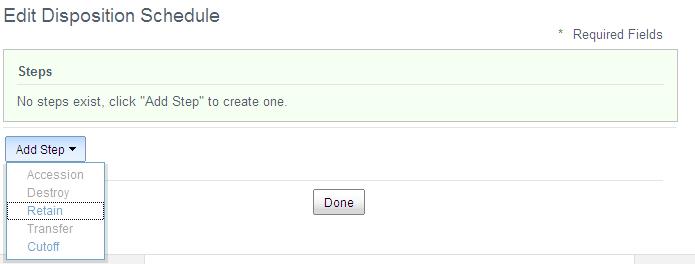
  • Event based cut-off requires manual intervention. Several events are built in to Alfresco and include all on the screen print below.


  • Multiple events can be added to a single file, and I can also set if all events must occur, or the earliest event to start cut-off.


  • After the cut-off is set, any number of intermediate steps can be added. For instance, transfer of paper records to a semi-active facility. Similarly in an electronic world, it could be possible to schedule archiving steps. ( I can't test how Alfresco handles content in multiple repositories).


  • I added a series/category/folder
  • I managed the permissions for all three to include my user ID.
  • I added scheduling steps, cut-off at the end of the year from publication date, then immediately destroy.

  • I then uploaded content, added the mandatory metadata for a few files, then declared the records, all with retroactive publication dates of December 14, 2010.
  • When I took care that I had viewing rights, the declared record did not disappear as before. Success!
  • I was expecting with a retroactive publication date for all contents the folder would update, showing it was ready for cut-off immediately. It did not.
  • I was able, however, to manually "Edit Disposition Date". This I did.
  • After editing the disposition date, I was able to cut-off the folder and then "destroy" it, as tested yesterday. Again, I was given two warning messages before destroy. The icon for the folder changed, and the content is gone.
I rate this test a PASS

Records Manager
  • Note that all subesquent steps are calculated from the cut-off date. If you are used to a schedule that says for instance, "Onsite for two years, then five years onsite, Destroy", the steps could be recorded as "1. Cutoff end of calendar year, 2. 2 years from cutoff, offsite, 3. 7 years from cutoff, destroy."
  • Alfresco appears able to handle complex scheduling requirements, multiple events, multiple steps.
Business User
  • As noted yesterday, if scheduling steps are working well, they should be fairly invisible to the regular user.
  • You would become aware of the scheduling rules if you request a file that has been destroyed. Your best assurance at that time would be to review the schedule and confirm that the record was destroyed on time, as authorized.
  • If you are ever asked for input on cut-off requirements, avoid event driven cut-off as much as possible, as they nearly all require manual intervention. Manual intervention equates to time-intensive management. Imagine receiving quarterly or annually a list of your folders, asking which can now be closed, or cut-off?

Developer
In an effort to simplify disposition actions, future schedule instructions may calculate retentkion from creation or "last modified" date. These may need to be added as cut-off conditions.

Notes
Testing DOD 5015.2 Features C2.2.2.7, C2.2.7.1.4, relating to GARP principle of Retention.

Thursday, February 17, 2011

Alfresco Test Day 8 - Create and Edit Schedule

Completing disposition actions on electronic records is the final piece of the RIM puzzle. Regularly disposing of business records that have completed their useful and regulatory life accomplishes several things:
  • It reduces clutter in the system by removing obsolete material, making current records easier to find.
  • It extends the life of your assets (software and hardware) by managing the growth of the system.
  • It reduces risk to the organization by trimming the volume of records that may be available for discovery as a result of a lawsuit. Costs for e-discovery can be prohibitive, and costs increase, the more unmanaged information you have.
To test the create and edit feature:
  • I edited an existing category, changing disposal to "immediate".
  • I added a folder, added content, then changed the status of the folder to "cut-off".

  • I "destroyed" the folder. At this point, it still showed up as a nub on the Alfresco site, but the content was gone.
  • Note that you will be given two confirmation notices before Alfresco will destroy.

  • I then deleted the folder. After deletion, the folder no longer shows up on Alfresco, but the history of the deletion is maintained on the Audit log.

  • When created my own series and categories with associated schedule information, the documents I added to them disappeared after I declared them records. I will trouble shoot this tomorrow. (Edited to add - I solved the problem of the disapparing records. If I did not manage permissions to include myself, declared records disappeared from view. They were there, I just didn't have permission to see them)
The steps for adding and modifying schedule steps are laid out in the Alfresco Wiki, "Setting up a Disposition Schedule".

I rate this test as a PASS

Records Manager
  • Folders must be cut-off before disposition action can occur. Usually retention starts from the cut-off date.
  • As a consequence, the schedule instructions for any category will have a minimum of two steps.
  • Alfresco guides you through this process by forcing the first step to be either "retain" or "cut-off"


  • I noted that a step cannot be deleted once created.

Business User
  • Most of the disposition activity will work in the background so you don't need to be actively involved in the process...unless you want to.
  • If a schedule has not been developed for your area, a RIM professional may ask for your input on how long you need your records for business purposes (be reasonable; pick something shorter than forever, and longer than "now").
  • Note that your preferred retention may be overriden by legislative requirements.
  • If your unit is affected by impending litigation, any disposition activity is suspended, or "frozen". There is a "freeze" feature in Alfresco that I will test on day ten.
Developer
  • I need the ability to delete a step in the scheduling process after it has been saved.
  • When created my own series and categories, the documents I added to them disappeared after I declared them records. I will trouble shoot this tomorrow.

Wednesday, February 16, 2011

Alfresco Test Day 7 - Authorizations - only authorized individuals can view portions, edit file plan and schedule

Today I test the authorization features of Alfresco, where users are given access based on their role. There's an instructional video in the Wiki under "Alfresco Records Management Administration Console", which I recommend to anyone with the Administrator role. In addition, "Try - Create Record Categories, Set Security and Configure Disposition Schedules" shows how to grant access to a category.

Individual series, categories, and folders can be configured to limit access. This allows business users to post their record content with the assurance that only those authorised can access the record. Here are the roles out of the box:


As a "Compliance Trial User" in the Alfresco cloud, I do not have access to the "Management Console"

  • I set up a new series and added permissions.


  • I added a new category under the series and gave a different permission to the category. I wanted to test what a user would view if they were NOT added to the series, but were added to the Category. I gave this user "Read and File priveleges".
  • When I opened the folder, I found the user had been given the same access rights as the parent category. This is good; it will save a lot of administrative time.
  • As a test user, I am not able to check if the users given their various access rights indeed only see what they are supposed to.

I rate this test as a conditional PASS
With my access rights, I am not able to test all access controls. The "Manage Permissions" feature was where I expected it to be and it performed as expected. It appears also that the Permission choices I am given are dependent on the role that is identified with the user.

Records Manager
  • If you have more than a hundred potential users, I recommend that access groups be set up to reduce the labour required to administer permissions (i.e. Science Faculty Group, Administrative Support Group, Human Resources Group).
  • I say potential users, because even if you roll out Alfresco to a pilot group at first, organization wide implementation may quickly follow and you don't want to be caught flat-footed.
Business User
  • Establishing access rights (permissions) lets you control who sees what, and who contributes where. 
  • Be prepared to list the initial categories/folders and the access rights required in your group and across the organization.
  • Controlling who has reading rights releases you to open files to viewing that can't be tampered with.
  • There are records that have corporate-wide value, so consider what folders you would grant read access across the business. 
  • Setting the controls and access in a structured system like this can reduce duplication and copying while improving security. Instead of sending a copy of a document on an unsecured e-mail system, you can provide a link. (The link is shown under the "Share" properties of every record.) The receiver must have the appropriate permissions, ID and password to access the document.
Notes
I tested compliance to features
  • DOD 5015.2 C2.2.1.1 to C2.2.1.6, C2.2.2.1, C2.2.8.1, C2.2.8.5
  • MoReq 3.1.4. 3.1.25, 3.3.6 , 3.3.7, 3.3.15, 3.3.16, 3.4.1, 3.4.2, 3.4.3, 3.4.4, 3.4.6, 3.4.18, 3.4.19, 4.1.2 , 4.1.3 , 4.1.4 , 4.1., 4.1.10, 4.1.11, 4.1.12, 4.1.13, 4.1.14, 4.1.17, 4.1.18, 4.1.19, 4.1.20
  • and relates to the GARP principle of Integrity.

Tuesday, February 15, 2011

Alfresco Test Day 6 - Searching and Retrieving

Today I tested Alfresco's search capabilities, including wildcard and boolean searches. These extended search capabilities are especiallly important for long or inconsistent record file names. Every file plan succeeds or fails on the strength of it's search ability. Trust of the system is dependent on the user knowing that when they transfer their record to our repository, they can find it again.
Wildcards allow you to replace a character or string with a replacement wildcard. For example, if I were looking for the "New York Giants Football Club", but was uncertain if the full title was given, I might try "N*Club" to catch "NY" and records with or without "Giants" or "Football".

Boolean web searches use AND, OR, and NOT. A memorable boolean search I attempted a few years ago was for a friend who wanted to open an online antique teacup store. After my first steamy hits on google, I narrowed the search to "buttercup NOT sex". What is it about buttercups and babes? I don't get it.
Anyways, back to testing. I created a few files and downloaded my thirty-nine test documents in to these three files. I then searched for the title, using the complete title and portions only.

After several days of effort, I discovered that I had failed to give myself access to the records I created! When I updated the permissions to the folder, my searches worked.


This is a search for any folders with the title, "Agreement:, and here is the result:

Using a wild card (*) for the title "Contract" worked as I expected, finding me more records.
I rate this test as a conditional PASS
I am still testing Alfresco's ability to conduct boolean searches.

Records Manager
The search feature appears robust, allowing us to narrow the search to any metadata element we've collected.


  • In addition, the search results can be customized to show us the elements we want to see, and in the order we want to see them.
  • Successful searches can be saved and re-used. This allows us the flexibility to build reports as needed to perform RIM functions (such as folders due for review or disposal) without having to customize Alfresco, or start an IT ticket for a custom report.
  • Note that depending on the permissions set-up, different users will obtain different results based on their rights. A user without permission will not even receive notice that the record exists. This is good.
Business User
  • Insist on a product with great search features. Test it out for yourself.
  • Test your own system regularly and follow up for the cause for any failed searches. 
  • The ability to find what you need is critical to the trust of any repository.
Developer
  • Add help screens to describe wildcard and boolean searches.

Notes
DOD 5015.2 Features C2.2.7.8.2 to C2.2.7.8.5, relating to the GARP principle 5, Availability.

Monday, February 14, 2011

Alfresco Test Day 5 - Destroying

On this day of testing I am checking the destroy feature. Can I delete/destroy a record that does not allow reconstruction? This checks the integrity of the system.

To test delete and destroy, I created a new category with a disposal conditions of Immediate after Cut-off event. I added a few documents, then recorded the cut-off event.

The folder and it's contents did not immediately delete; not what I expected. I'll test more when I get to the scheduling stage. Below is a list of "events" for that folder, which includes the cut-off.


I then simply selected the "Delete" feature for the folder, and it immediately disappeared from the File Plan. All the "child" documents similarly disappeared. However, when I checked the audit log, the creation and deletion of the file was recorded. This is good. An ECM system should record all events, including deletions, as long as the contents are not maintained.


I rate this test as a PASS

Records Manager
  • Cut-off is the first step in conducting disposition actions in the DOD standard. See the definition of cut-off under notes, below.
  • When a parent folder is deleted, the child documents/records are deleted as well.
  • The folder is completely removed from the file plan, but the audit log remains. This is good.
Business User
  • Delete works, and destroyed is truly gone.
  • The history of creation and deletion is retained, however, and this is good. 
Notes:

This is a test of DOD feature C2.2.7.6.3, Relating to GARP Section 2, Integrity.


Definition of Cut-Off: DL1.28. Cutoff. To cut off records in a file means to break, or end, the record at regular intervals to permit disposal or transfer in complete blocks and, for correspondence files, to permit the establishment of new files. Cutoffs are needed before disposition instructions can be applied because retention periods usually begin with the cutoff, not with the creation or receipt, of the records. In other words, the retention period normally does not start until the records have been cut off. Cutoffs involve ending input to old files and starting input to new ones at regular intervals (Reference (f)). Cutoff is sometimes abbreviated as COFF and is also called file cutoff or file break.

Alfresco Test Day 4 - Transferring - documentation of transfer activities

Today I am testing the feature allowing documentation of transfer activities in an electronic format that can be saved as a record. This feature is important as it provides an automated audit trail of movements, and relates to the Generally Accepted Record Keeping Principles (GARP) of Complaince and Integrity.

If a record were ever transferred for inappropriate reasons (unathorized disposal of a valued or controversial record), this audit trail should identify who, where, and when it was transferred.

I created two folders under different categories, downloaded multiple documents to one folder, then used the "Copy to...", "Move to..." and "File to..." actions to move several documents to the other folder. I then viewed the audit log for the copied document.

Both times I tried to copy, my initial attempt failed, but worked on second try. I was unable to successfully Move a document. Below is the error message I received. There must be a bug in the system and I will be forwarding this problem to the Alfresco community page for a fix. I'll update this page if it gets worked out.


I rate this test as a conditoinal PASS
The "Move to..." action failed. However, the audit logs tracked all changes and was available to view and print, as required.

Records Manager
  • There are audit logs for Series, Category, Folder, and Document. Here is as sample audit log for a document.


  • The audit log at the category level, the first row describes the current metadata for the category. Below that, all moves, adds and changes, including added folders, and action to all folders, is recorded. This would be a useful report showing folder activity.
  • The audit log at the folder level, similarly the first row describes the current metadata for the file. Below that, all moves, adds and changes, including added documents (records) is recorded.
  • The audit log at the document (record) level shows all changes to the document.
Business User
  • "Copy to.." and "File to..." allow you to copy your document to a different folder. Every time I tried this, I had to do the action twice to get past the fail.
  • "Move to..." failed every time I tried it. I will report this bug to the developers. 
  • Thankfully the audit log function is for your reassurance only. Your Records and Information Management professionals are responsible to monitor the logs for complaince.

Developer
  • The "Move to..." activity fails, that must be fixed.
  • I would like to see a new summary audit log of all activity (for a specified time period) including series, category, folder, and document. The columns might be: Time stamp,Unique Record Identifer, level (Series, Category, Folder, or Document),  Type of change, and User. The Records Manager then could then scan the list for audit checks and reference the Unique Record Identifier for details.
  • I noted that a copied record did not track it's source as a "previous value". This reduces the value of the audit log as there is no way to track back copies to their original source.

Notes
Checking standard DOD 5015.2, Feature C2.2.7.5.5, C2.2.9.1.3, C2.2.9.1 and MoReq 3.4.15, 3.4.16, 3.4.29, 4.2.1, 4.2.2, 4.2.4, 4.2.6, 4.2.8, 4.2.9, 4.2.10, 4.2.11. Relates to GARP Compliance, Integrity.

Saturday, February 12, 2011

Alfresco Test Day 3 - Transfer Record Elements - Parse metadata elements from ingested data using GUI

Today I chose to review the feature to "Parse metadata elements from ingested data using Graphical User Interface (GUI)." What this rather awkward sentence is trying to say, is that metadata should transfer along with the document. Alfresco should recognize metadata and put it where it belongs (parse). GUI simply means as users we have an easy to use entry screen. While I was at it, I also checked if additional metadata from e-mail messages transfers (date received, addressee, other addressee)". My special interest in these features is to confirm that source metadata transfers seamlessly, in the hope that we can reduce or eliminate the need for human intervention.

For this test, I manually updated the metadata of a word document and uploaded it to a folder. I also uploaded an HTML and MSG format e-mail to see if their additional metadata elements transferred.

The updated metadata element, author, did transfer; the metadata element for "Company" did not. The additional HTML and MSG metadata elements did not transfer either.


The metadata elements that do transfer are Name, Title, Author, Creation Date, Size and Mimetype. I notice in the Wiki instruction, "Records Management Administration Console", that the Administrator has the power to map metadata elements from E-mail to Alfresco, and also allows for "drag and drop" of e-mail in to Alfresco. Though I cannot test this, I suggest that it be an important feature to be reviewed at initial set up, with all mandatory metadata elements mapped.


I rate this test as a bare PASS
It looks like it is possible to map automated transfer of metadata elements, but it is unavailable to test in the cloud.

Records Manager
  • Warn your users that the current Alfresco requires some manual intervention to populate mandatory metadata elements.
  • Talk to IT about bulk populating the documents in your system; for instance, Originating Organization with your business name. This should be possible as the opportunity to bulk populate is listed in the DOD standard (C2.2.7.5.6).
Business User
You can view the metadata elements of your Word 2010 document at any time under File>Info. Microsoft calls the metadata elements "properties".

Developer
Build additional links between the metadata elements of documents and Alfresco; for instance,
  • Company to Originating Organization
  • Author to Author AND Originator
  • E-mail, Correspondence - Date Received, Addressee, and Other Addressee.
This should be done at setup, but I can't test in the cloud. The Wiki tutorial describes mapping elements from IMAP e-mail clients.

Notes
DOD 5015.2, C.2.2.4.7 and C5.1.6 for parsing metadata elements from ingested documents.

Friday, February 11, 2011

Alfresco Test Day 2 - Declare a Record

This is day two of a ten day trial of Alfresco RM, the next step to a paperless office by allowing you to file  records so that your electronic record is authentic and defensible. Today I am testing the "Declare a Record" feature, which includes uploading documents in to folders, updating mandatory metadata, and declaring (or publishing) the record.

The act of declaring the record flips the switch to authenticity. You are declaring, "On this day, this is what is said, by me." (Who, What, When).

I tested uploads in the following formats:

Graphic Interchange Format Image (GIF)
HyperText Markup Language document (e-mail) (HTML)
Joint Photographic Experts Group Image (JPEG)
Microsoft Excel (XLX)
Microsoft Power Point (PPT, PPTX)
Microsoft Word (DOC, DOCX)
Outlook Item (e-mail) (MSG)
Portable Document Format Document (PDF)
Portable Network Graphics Image (PNG)
Text Document (saved e-mail) (TXT)


The upload feature worked beautifully until I tried mixing Outlook and HTML formats with other types. The upload did not show as being completed, but the documents did load after a couple tries. (On subsequent days I had no problems uploading or mixing types). The Outlook format MSG did upload but is not readable within Alfresco. When I downloaded, however, the current version of Outlook opened the document for me. The MSG format fails the authenticity test, as the document must be readable for the lifetime of the record and cannot be dependent on outside software.

I then added mandatory metadata fields for selected records, and declared them. Note the updated documentation for a declared record.

Another test of authenticity is to check if a declared record can be subesquently changed or overwritten. Alfresco does allow me to download and modify a declared record. If I try to upload the modified document under the same name, however, Alfresco modifies the title (i.e. DeclaredRecord.doc and new DeclaredRecord-1.doc). When I tried to modify the title to overwrite the declared record, I was given an error message, below (red text mine). This is good.


I rate this test as a PASS

Records Manager
Work with your IT support to confirm that all users are identified on the system (full name and originating document) to support autofill of mandatory fields. Here are the mandatory fields. Originator, Originating Organization, Date, Publication Date, Name of Document, and Title of Document. Some of these fields are autofilled by Alfresco from the source document.


If your project includes any significant scanning, make sure your scanning process includes capture of the mandatory record characteristics: Originator, Originating Organization, Date, Publication Date, Name of Document, and Title of Document.

Posting of e-mail as records is cumbersome, turning a three-step process in to four steps (save as HTML to shared drive, upload, add metadata, declare).
  • I first saved an e-mail on to my drive in HTML format then uploaded it. The HTML appeared to fail but it uploaded anyways.
  • The Outlook format (msg) fails the authenticity test as it is software-dependent (Outlook)
  • The (txt) format fails the authenticity test as all formatting is lost.
I notice in the Wiki instruction, "Records Management Administration Console", that the Administrator has the power to map metadata elements from E-mail to Alfresco, and also allows for "drag and drop" of e-mail in to Alfresco. Though I cannot test this feature, I suggest that it be an important feature to be reviewed at initial set up, with all mandatory metadata elements mapped.

Because the RM product distinguishes declared records from drafts/copies, I recommend that you do not set up the Records Management module for drafts and working papers. Rather, use Alfresco Document Management (DM) or Collaboration (Share). If users require structure to manage your working documents, create a similar structure to your RM in DM or Share.

I estimate perhaps 5% of total unstructure documents maintained by a system (e-mail, shared drive) would need to be declared a records in RM. An exception to this would be transactional and case activities such as applications and client records, where nearly all documents created would end up as records.
  • If an organization adopted the tight ISO 15489 definition of a record (evidence of a business transaction);
  • Publishes Records and Information Management (RIM) policy including the role of every employee to identify and declare their records to the file plan;
  • Instructs every employee on their obligation to declare business records (evidence of work completed, decisions made, commitments);
  • Audits the RM system for compliance, following up where gaps are found;
  • THEN the organization can make a strong argument, if ever involved in e-discovery, that scrutiny be limited to the official record only (5% of total documents held). Draft, informal, reference, and incomplete information, with potentially inconsistent or embarrassing content, would be excluded from prying eyes.
This managed use of the RM system could be very good for the organization, making RM achievable again.

Business User
From within a file folder, uploading a document and declaring it as a record is a three step process:
  1. Upload: Click "File" from your top bar. You are prompted; "Are you filing an electronic or paper record?" Select electronic.Click on the button "Files to Upload" and browse to the location to upload files. Select by double clicking, and when you have all your files selected, click OK.
  2. Add Metadata: Your documents are now loaded in the folder, "Undeclared Record". You may have the option to "Declare as Record", but most likely you will need to add metadata first. Click on the "Add Metadata" option on the right of the document, add all mandatory fields (starred), and Save.
  3. Declare Record: Click on the "Declare Record" option on the right of the document. You will notice that the yellow "Undeclared Record" warning is removed, and date filed, publication, and originators are all recorded.


The advantage of declaring a record:
  • You can distinguish the original, official, or "master" record from drafts.
  • You always know where your original is.
  • Declared records help you manage all your commitments, evidence of work promised and done.
  • If ever challenged through litigation, you could argue that discovery be limited to your official record repository, reducing risk and cost to your organization. (This could only be argued if you can produce evidence that declaring records is the stated and followed process for all records in your organization).
I am compelled to list these advantages because this three-step process is cumbersome. There are too many mandatory fields to be entered manually. This is not the fault of the developer; these are all mandatory entries as identified by the DOD and Dublin Core standards to confirm and maintain the authenticity of the record  (see notes below). A solution would be to build intelligence in to the software to autofill these mandatory fields.

Because of this distinguishing of declared records and drafts/copies, I recommend that you do not file drafts and working papers from your unmanaged content (shared drives and e-mail) in the Records Management module. Rather, use Alfresco Document Management (DM) or Collaboration (Share). If you need structure to manage your working documents, create a similar structure to your RM in DM or Share.

Developer
The manual entering of mandatory metadata elements is cumbersome.
  • I see that Title autofills with the Name, with the option to ovveride. This is good.
  • Wherever possible, the system should autofill mandatory elements. Publication Date, for instance, could default to the current date (with the user having the option to override).
  • Can we tighten up the metadata page to one screen?
  • Put "Declare as Record" button at the bottom of the Metadata entry screen to eliminate a step.
  • Does the enterprise version allow for drag-and-drop? This would be especially useful for e-mail.

Notes 
Can a declared record be modified or overwritten? DOD 5015.2, C2.2.3.7.
Dublin Core for Metadata, cross referenced to DOD 5015.2  and Alfresco field names as listed below.

DOD 5015.2Dublin CoreAlfresco Field
C2.T3.5contributor, creator, publisherOriginator (mandatory)
C2.T3.6contributorOriginating Organization (mandatory)
C2.T3.4datePublication Date (mandatory)
C2.T3.2subject, titleName, Title (mandatory)
C2.T3.1identifierUnique Record Identifier (mandatory)
rights
C2.T3.11relationAddressees
coverage
C2.T3.3date
C2.T3.10dateDate Received
descriptionDescription
C2.T3.9format [MIME]Format
language
C2.T3.13Location
C2.T3.8typeMimetype, Media Type
C2.T3.14
C2.T3.12relationOther Addressees
relation
source
C2.T3.7Supplemental Marking List

Wednesday, February 9, 2011

Alfresco Test Day 1 - Implement File Plans

This is day one of a ten day trial of Alfresco RM, the next step to a paperless office by allowing you to file electronic records so that your electronic record is authentic and defensible. Today I am testing the "Implement File Plans" feature which should allow me to create a file plan, edit, sort and view. With each test I will declare a pass or fail, recommendations for the developers, RM community and business user, and lessons learned along the way.


  • In two clicks from the Alfresco cloud, I am at the Records Management Site.
  • Note the Wiki and File Plan options from the banner.
  • The Wiki contains some tutorials; a good start for new users.
  • I quickly built a couple series, categories, and folders. I uploaded documents in to a couple folders with little difficulty (I received one error message that an entry had failed, but when I tried again it succeeded).
  • I uploaded seventeen documents of various types (jpg. pdf, xls) all at once. It took a few minutes in the cloud, but it also tracked my progress by green bar.
  • I also edited category names by changing the metadata.
I rate this test as a PASS

Records Manager
New Series - show up in the left Navigation pane after refreshing the screen (F5).


  • Add first your Series, then Category then Folder.
  • If you are using a functional file plan for your organization, then Series would relate to Function, Category to Sub-Function, and Folder to Activity.
  • If you are using a block-numeric subject classification system, then Series would relate to Block, Category to Primary, and Folder to Secondary.
  • Records can then be imported in to the folders you have made. This is the first level where documents can be added.
  • Schedule information is added at the Category level.
  • The term "Expression" is referring to a scheduling function, the number of days/months/years after an event when the records reach final disposition action.
  • All mandatory fields are starred (*). Alfresco won't let you move on from an entry window until all mandatories are completed. (good).
  • The system will not allow a Category to be saved with a review period of "Not Set", and if "None" is selected, it will not allow the expression field to be completed. (good).

Business User
  • Before you can upload documents, the File Plan Series, Categories, and Folders must first be set up.
  • You may or may not be granted permission to edit these, so see someone with those permissions (Out of the box, this would likely be the Administrator, Records Manager, and Power User)?
  • Documents are added to folders.
Developer
Is there a way for a complete file manual to be imported? I suspect this may be available in the full version -  not in the cloud - as there are greyed out buttons on the RM site. I expect an import document would need to be in a specific format (i.e. tab delimited) with a one-to-one relationship to all mandatory fields. It looks like there would need to be separate imports for Series, Category, and Folder.

Notes:
This test checked compliance to DOD 5015.2 requirements C.2.1.1.1 to C.2.2.1.6 and MoReq 3.1.4

Tuesday, February 8, 2011

Ten Days of Testing

Starting tomorrow, I will undertake ten days of User Acceptance Testing of Alfresco RM 2.0, designed to manage an organization's electronic records. Products like these pave the way for a green, paperless office. I must know if it lives up to its claims before I actively promote it, and by dedicating these ten days I will build a list of recommendations and tips that will help business users implement with a minimum of fuss.

Implementation Enterprise Content Managment (ECM)/Electronic Document Management System (EDMS) can often exceed the cost of the product itself, as successful implementation depends on the business having a clear understanding of what it does and how work flows. There are frameworks to build, decisions on accessibility and security, and intelligent roll-out with plenty of hands-on training. You just can't take away a man's files without giving him a sensible replacement.

So let's reduce the fuss and make these products easy to implement.

I've picked ten critical features to test that are identified on both the DoD 5015.02-STD and MoReq standards. You can request a copy of my comparison matrix by popping me an e-mail.

Over ten days I will test the following features:
  1. Implement File Plans
  2. Declare and file - prevent subsequent changes (integrity of the record)
  3. Transfer Record Elements - Parse metadata elements from ingested data using GUI
  4. Transferring  -  documentation of transfer activities including system audits
  5. Destroying - deleting in a manner that prevents reconstruction
  6. Searching and Retrieving - including wild card and boolean searches
  7. Authorizations - only authorized individuals can view portions, edit file plan and schedule
  8. Schedule - create and edit schedule
  9. Schedule  - implementation up to disposal
  10. Schedule - freezing and unfreezing records
With each test I will declare a pass or fail, recommendations for the developers, RM community and business user, and lessons learned along the way. RIM professionals must remember that the end result must be a support to the business, rather than a barrier. Let's not allow our native passion for order blind us to the gutsy reality of daily use. Even if imperfect, it must be easy to use.